One ecosystem for local commerce
Run the shop.
Get found by the city.
MBM does the billing, the khata and the stock count for 150,000+ businesses in 177 countries. What a shop sells can become its own website and a result on Cityo — so the next customer finds it.
BharatApps in numbers
businesses billing on MBM every day
countries where MBM is available
ways to take payment on a bill: cash, UPI, card, bank transfer, cheque and other
The ecosystem
One family of apps, each with one job
Businesses run on MBM. Their staff use Shiftly. Shoppers use Cityo. Influencers and freelancers get hired through MBM. Everything else connects a shop to more customers.
 For businesses
MBM — My Business Manager
Bills in seconds, the khata, cashbook, stock, staff and tax invoices — on one Android phone, printed on a Bluetooth receipt printer.
Explore MBM For shoppers
Cityo
Search products, menus, services and jobs from shops near you, then order or send a request straight to the shop.
Explore Cityo For staff
Shiftly
Join your shop by scanning one QR code, punch in and out, see your tasks and your salary records.
Explore Shiftly For the counter computer
MBM Web
The same shop on a computer: billing with a barcode scanner and keyboard, khata, stock and reports. For Scale Plan shops.
Explore MBM Web WWWFor getting onlineAI Websites
A website for your shop at yourshop.bharatapps.store, built by AI from your MBM catalogue in one click.
Explore AI Websites For partners
MBM Sales
Bring businesses to MBM and earn 10% of every verified subscription and website payment they make.
Become a partnerMBM for creators
Arriving in the next MBM updateA creator page with your niches, your services priced in your own currency, and your work. Businesses find you in MBM and in Cityo search and send hire and collaboration requests, free.
Explore MBM for creatorsHow it connects
From a bill at the counter to a customer at the door
Each product does one thing well. Together, the work a shop already does in MBM is what brings it new customers.
Sell and bill
Pick items or scan a barcode, take cash, UPI, card or put it on the khata, and print the receipt.
MBM · MBM WebThe books keep up
The bill, the stock count and the ledger entry are saved together, so the cashbook and the shelf agree.
MBMThe shop goes online
The catalogue becomes a website on its own bharatapps.store address, with orders and enquiries going to the shop.
AI WebsitesThe city finds it
Shoppers search on Cityo, see the shop and what it sells, and order or ask — straight to the shopkeeper.
Cityo
Cityo search
What are you looking for?
Products, food, services and jobs from local businesses.
Popular searches:
For business owners
Everything the counter needs, in your pocket
MBM is built for the shopkeeper with a customer waiting. It is quick to bill, careful with money, and it speaks your country's money and tax.
- Bills with cash, UPI, card, bank transfer, cheque — or on the customer's khata
- Receipts on 58 mm and 80 mm Bluetooth thermal printers
- Stock with barcode scanning and low-stock alerts
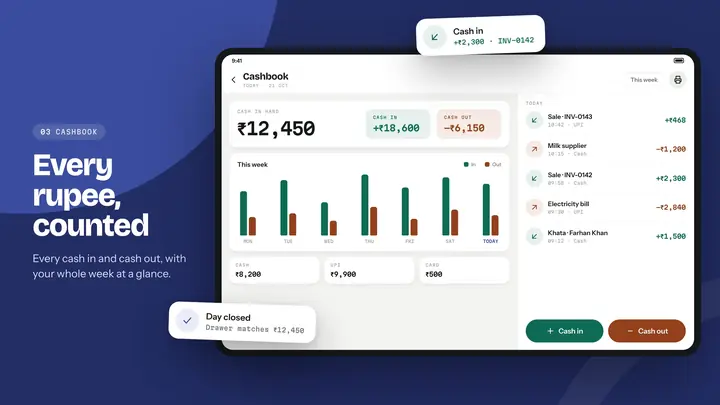
- Cashbook: every rupee, dirham or dollar in and out
- Staff attendance, advances and payslips
- Tax invoices that use your country's names: GST, VAT or Sales Tax
Made in Bharat, used worldwide
Your country's money, tax and numbers
MBM is available in 177 countries. Prices show in the shop's own currency, and invoices use the local tax name and tax-ID label.
Your currency
Amounts are shown in the currency the shop sets, not a fixed one.
Your tax name
The tax line reads GST, VAT, Sales Tax or Tax, depending on the country.
Your tax number
The number is labelled GSTIN in India and Tax ID elsewhere.
Get the apps
Pick the app that fits who you are
Questions
Good to know
How are BharatApps, MBM and Cityo related?
BharatApps is the company and the platform. MBM (My Business Manager) is the app businesses use to bill and run the shop. Cityo is the app shoppers use to find local businesses and what they sell. Shiftly is for a shop's staff, MBM Web puts MBM on a computer, and AI Websites give a shop its own site.
Is MBM only for India?
No. MBM is available in 177 countries. Amounts use the shop's own currency, and invoices use the local tax name (such as GST, VAT or Sales Tax).
How does a shop get its own website?
Inside the MBM app, a shop can buy a website once. It is built by AI from the shop's MBM catalogue and published at its own address on bharatapps.store. More about AI Websites.
Can I use MBM on a computer?
Yes — MBM Web is the desktop version, available to shops on the Scale Plan. You sign in with the Google account linked to your shop. More about MBM Web.
How do I contact you?
Write to mybusinessmanager@bharatapps.store or see the contact page.